
1 · Connect the hardware
Take the harness out of the box and plug it into your parts. Then USB, then the power supply.
Products / P1LOT One
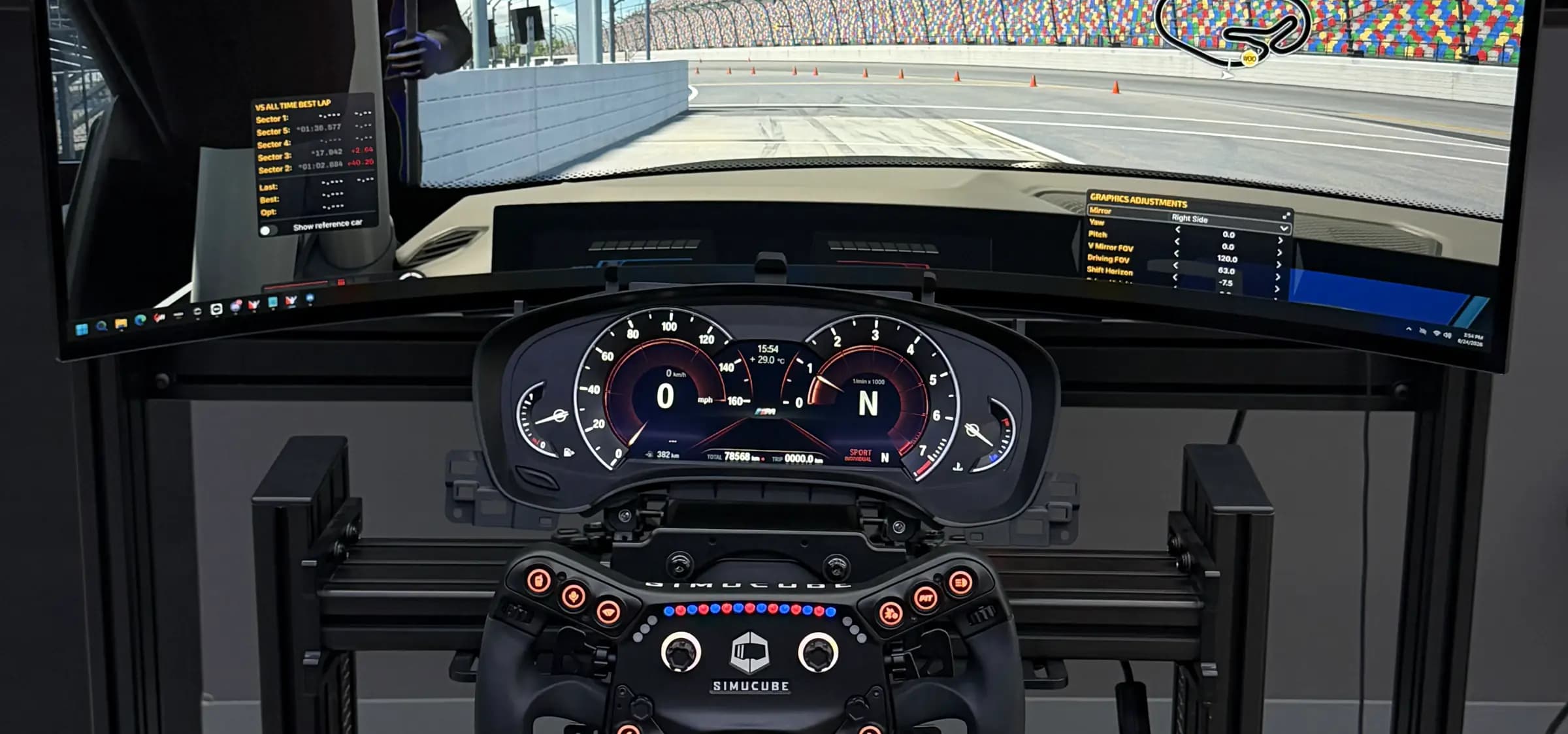
The interface adapter connects genuine instrument clusters, gear selectors and rotary controllers from BMW and Porsche cars, driven from your game. Plug and play, with no programming or soldering required.
10 people have reserved so far
Everything except the car parts themselves. The harness is the one item made to order. Build the combination you need in the configurator below, and every connector arrives with a sticker naming the part it belongs to.
Will it work with mine?
Three instrument clusters run today. The BMW F30 6WA, the BMW G30 6WB and the Porsche Panamera 970, alongside the F-series GWS gear selector and the fourth-generation iDrive-type rotary controller. All of them are parts out of real cars, bought used, and every one has been driven on our own bench before it was written down here.
| Part | Vehicles it came out of | Status |
|---|---|---|
| Semi-mechanical clusterInstrument clusterKOMBI 6WA, instrument panel with extended scope | BMW 3 and 4 Series, F30 F31 F32 F33 F34, roughly 2012 to 2020.621092958696210680498262105A03A3362109436307621088032106210684724762106843144 | ShippingCAN2, pins 10 and 5 |
| Semi-digital clusterInstrument cluster6WB, the digital or semi-digital panel | BMW 5 Series G30 G31, and the same cluster in G32, G11 G12 and X3 G01, roughly 2016 to 2019.62109392558621098782846210987828662109878290 | ShippingCAN2, pins 10 and 5 |
| Panamera clusterInstrument cluster970.641.126.04, the VDO cluster | Porsche Panamera 970, first generation, roughly 2010 to 2016.9706411260497064112604A05 | ShippingCAN1, pins 3 and 9 |
| F30 gear selectorGear selectorGWS, the gear selector switch | F-series automatics. The catalogues carry this selector for the 1 and 2 Series F20 F21 F22 F23, the 3 Series F30 F31 F34 F35 and the 4 Series F32 F33 F36.61319253651613192609686131929151761319296896 | ShippingCAN2, pins 10 and 5 |
| iDrive-type knobRotary controllerZBE4, the fourth-generation controller | The centre console of the F range. The catalogues list this number across the 1, 2, 3, 4, 5, 6 and 7 Series and the X3 to X6. That is where BMW fitted it, and not a list of cars we have tested.65829332285 | ShippingCAN2, pins 10 and 5 |
| G-series multifunction wheelSteering wheel | The G-range wheels. The button carriers sit in the spokes, the cruise row on the left and the media block on the right. The block is what matters rather than the rim. | ShippingLIN, pin 4 |
| Decoded or committed, not offered yet | ||
| Real pedalsPedals | The inputs read 0 to 5 V, which is what a pot in a car gives. Wiring notes for specific pedal sets are added as each is confirmed. | PlannedAnalog in, pin 6 + Analog in, pin 1 |
| Column stalksStalks | The switch cluster behind the same dashboards. Which line it lands on is confirmed when it ships. | Plannedline confirmed at release |
A part that is not on this list is a decoding job rather than a different product. The interface speaks the buses these all sit on, and what a given module says is firmware. New parts arrive as a free update on a board that already shipped.
One connector leaves the interface and splits into the parts you are driving. Slide a branch to put something on it, or leave it empty. Press the picture to see what to check before you buy the part.
Warning!DB15 is widely used. Connecting third-party cables may permanently damage the cable, the device, or whatever is connected to it.
Instrument clusterInstrument clusterSemi-mechanical clusterShippingCAN2, pins 10 and 5Needles that sweep to your speed and revs, the gear and drive mode on the colour strip beneath them, and every telltale the car had. Fuel and coolant read as well, so the two small dials either side are not decoration.Semi-digital clusterShippingCAN2, pins 10 and 5The same signals as the F30 panel, drawn rather than swept. Speed and revs are rendered on the screen and follow the drive mode selected in the game. Fuel and temperature stay on real needles at the edges.Panamera clusterShippingCAN1, pins 3 and 9Revs in the middle, where this marque has always put them. Speed, gear, boost, oil pressure, coolant, fuel and tyre pressures all read live, and the trip pages on the screen answer to the knob beside it.
Choose your instrument cluster4 of 4
Panamera cluster
Revs in the middle, where this marque has always put them. Speed, gear, boost, oil pressure, coolant, fuel and tyre pressures all read live, and the trip pages on the screen answer to the knob beside it.
Porsche Panamera 970, first generation, roughly 2010 to 2016
In use Revs in the middle, on a real needle, where this marque has always put them. Speed, boost, oil pressure and coolant move with the car you are driving.
The screen beside them is a second panel. Voltage, boost, coolant, oil pressure, tyre pressures. Step through the pages on the column knob mid-stint, the same way you would in the car.
Backlight is on with the ignition and off without. This generation never had a dimmer, so there is nothing to set.
Where a road car keeps its odometer, this one shows the service page. Nothing here reads a mileage and nothing writes one.
Known as 970.641.126.04, the VDO cluster
Part numbers9706411260497064112604A05
Gear selectorGear selectorF30 gear selectorShippingCAN2, pins 10 and 5A real automatic lever, sprung so it always comes back to the middle. Nudge it, push it fully, or knock it across into the manual gate. Every movement is a gamepad button you bind yourself, so which one is Reverse is your decision. It lights the gear the game is in on its own display.
Choose your gear selector2 of 2
F30 gear selector
A real automatic lever, sprung so it always comes back to the middle. Nudge it, push it fully, or knock it across into the manual gate. Every movement is a gamepad button you bind yourself, so which one is Reverse is your decision. It lights the gear the game is in on its own display.
F-series automatics. The catalogues carry this selector for the 1 and 2 Series F20 F21 F22 F23, the 3 Series F30 F31 F34 F35 and the 4 Series F32 F33 F36.
In use Out of the box the lever sends its movements and your game keeps its own gearbox. Nudge it forward for a downshift, back for an upshift, knock it across into the manual gate. The panel shows whatever the game did with them, so the letter on the dash is the game's answer rather than the lever's.
For a game with no gear lever modelled in it, the device keeps the gearbox instead. The lever picks Park, Reverse, Neutral and Drive and counts its own gears in the manual gate. Each position arrives as its own button, thirteen in all. Nothing on the PC has to understand a lever. It sees buttons.
Binding is one gesture either way. Hold the P button for five seconds and the rig wakes up, the gear readout blinks to say it has, and every position you push offers itself to the game's binding dialog in turn. Press P again when you are done.
One point is worth knowing before use. Push the lever all the way and you get a single press for where it ended up, never the notch it passed through. Hold it at the first notch instead and that is what you get, a quarter of a second in, held for as long as you keep it there. Both notches are real positions, and the lever tells them apart so the game does not have to.
Switch the ignition off in the game and it winds itself back to Park under its own motor, the same as it does in the car.
And when no game is running it stops being a gear lever and starts scrolling. One notch is a line, two is a whole page, in whichever direction you pushed. A spring-centred lever with two travels in each direction makes a better scroll control than most things on a desk. Between sessions it reads a results screen or a leaderboard. The moment telemetry arrives it is a gear lever again, so a shift during a race cannot page the screen.
Known as GWS, the gear selector switch
Part numbers61319253651613192609686131929151761319296896
Rotary controllerRotary controlleriDrive-type knobShippingCAN2, pins 10 and 5Turn it, press it, rock it four ways. The control a pit menu actually wants, and the one to put brake bias, traction control and engine map on without taking a hand off the wheel for long.
Choose your rotary controller2 of 2
iDrive-type knob
Turn it, press it, rock it four ways. The control a pit menu actually wants, and the one to put brake bias, traction control and engine map on without taking a hand off the wheel for long.
The centre console of the F range. The catalogues list this number across the 1, 2, 3, 4, 5, 6 and 7 Series and the X3 to X6. That is where BMW fitted it, and not a list of cars we have tested.
In use It sorts itself out. Turn it and the volume moves. Press it to play or pause. Rock it left and right to skip tracks. Nothing to set up and nothing to bind. The labels on the buttons are what they do.
Fit a dashboard with menus of its own and it takes what it needs first, so the knob walks that panel the way it did in the car. Whatever the panel does not use stays music, and whatever is left after that is a plain button your game can bind. Every control on the knob lands somewhere.
The same knob therefore behaves differently on two different rigs. The app reports how yours came out, one line per job, naming the part that took it.
Press RADIO and the whole unit becomes a controller. Every button reaches the game, and the rocker and the turn arrive together as a d-pad. That is the mode for a binding dialog, where each control has to reach the title. Hold MEDIA for two seconds to come back. A short push in and a long push out, so returning mid-corner never costs a hold.
The touch pad on top works in both modes and clicks by itself. One finger taps left, two taps right, and two dragged together scroll.
Known as ZBE4, the fourth-generation controller
Part numbers65829332285
Steering wheelSteering wheelG-series multifunction wheelShippingLIN, pin 4The button blocks off a real steering wheel, on the wheel you already race with. Volume, track and the dashboard's own menus, under the thumbs that are never leaving the rim.
Choose your steering wheel2 of 2
G-series multifunction wheel
The button blocks off a real steering wheel, on the wheel you already race with. Volume, track and the dashboard's own menus, under the thumbs that are never leaving the rim.
The G-range wheels. The button carriers sit in the spokes, the cruise row on the left and the media block on the right. The block is what matters rather than the rim
In use The part that makes the rest of the rig disappear. Everything for music sits under the right thumb. Volume on the rocker, tracks on the two arrows, play on the scroll wheel pressed in. None of it needs a hand off the rim, which is why the buttons are there in the car.
Fit a dashboard as well and the wheel drives its menus from the same buttons that did it in the car. The scroll wheel walks the list, the press enters, the board-computer button opens it. Whatever that panel does not use stays with music, and anything left over is a plain button the game can bind.
The cruise row is left alone deliberately. Five buttons, untouched, straight through to the game. They are the only controls on the rig whose original meaning already has an equivalent in a racing title. A pit limiter bound to LIMIT takes five seconds and is immediately right.
The rocker beside them scrolls, but only when nothing is driving the rig. A light push is a line, a firm one a page. Between sessions it reads a results screen. Once a game starts sending telemetry it is an ordinary button again, so it cannot page the screen mid-race.
Its backlight follows the car. The same dimmer the dashboard listens to reaches the wheel, so at night the two match rather than one of them sitting bright next to the other.
PedalsPedalsReal pedalsPlannedAnalog in, pin 6 + Analog in, pin 1Throttle and brake read off their own pots and handed to the game as axes, so the pedals under your feet can be the ones out of a car.coming
Real pedals
Planned
Throttle and brake read off their own pots and handed to the game as axes, so the pedals under your feet can be the ones out of a car.
The inputs read 0 to 5 V, which is what a pot in a car gives. Wiring notes for specific pedal sets are added as each is confirmed
StalksStalksColumn stalksPlannedline confirmed at releaseIndicators, main beam and wipers, read back into the game.coming
Column stalks
Planned
Indicators, main beam and wipers, read back into the game.
The switch cluster behind the same dashboards. Which line it lands on is confirmed when it ships
Line: line confirmed at release.
Something elseline unknown
Not on this list?
Tell us what you have and what it should do. A new part is a software job rather than new hardware, and it arrives as a free update on the board you already own.
Ask for itYour harness
Your parts come from two different cars, so they go on the two different bus pairs: the Porsche panel on CAN1, the BMW parts on CAN2. Both are on the same connector and the loom is built that way. Nothing needs setting. Each maker numbered its messages without reference to the other, and one pair each is what keeps those numbers apart.
ConfigurationP1-C3-S1-K1-W1-ASM
The board comes with its connector, so an empty tree is the whole price. Everything above it is the loom, built for the branches you chose. Shipping is worked out when you order.
Add to order — $264Every cable is made for a specific hardware configuration. Connectors from the same family may look identical and physically fit multiple devices, but their pinouts can be completely different. A connector fitting your hardware does not mean that the cable is electrically compatible. Using the wrong cable can apply power to a signal pin and cause permanent, irreversible damage to your hardware. Always use the cable specified for your exact hardware.
Each connector on your harness carries a sticker naming the part it belongs to. Go by the sticker. Swapping a harness between parts, re-pinning one, or wiring one from a pinout found elsewhere is at your own risk.
Whatever SimHub supports: BeamNG.drive, the Forza titles, Assetto Corsa, iRacing, Dirt Rally, the truck simulators and well over a hundred more. The game list is SimHub's, not ours. SimHub is free and runs on Windows.
Every option in the configurator above carries the factory code and the part numbers it covers, and a photograph of the connector with each pin named. The number is printed on the part itself. Match it against the list and you have your answer before you spend anything.
Take the harness out of the box and plug it into your parts. Then USB, then the power supply.
Download our template and paste it into SimHub. One file, free, and it is the only configuration there is.
SimHub picks up the game on its own. The dashboard wakes and follows what you drive.
The full walk-through, with what you should see at each step
Download the SimHub template
Updates
The board already does more than the firmware asks of it today. More dashboards, more modules, more things to plug in: all of it reaches you as a free update.
Updating takes a minute. The board shows up as a drive, you copy the file onto it, and it restarts. It is the same as putting a file on a memory stick. No programmer, no account, nothing to pay.
An interrupted update cannot break it. The old firmware is only replaced once the whole file has arrived and been checked.
Every release, and what changedGauges and pedals keep their settings, and a dashboard no longer wakes up showing warnings it was never given.
SHA-25600c0e2f7234dcf3a100bcfa9004c37129f8d59cc78e97558059bd9030a327603No. Three cables and one setting in SimHub. If you can set up a wheel and pedals, you can set this up.
A dashboard, a gear selector and a rotary controller. One of each, on one connector, in any combination you like. Everything we drive is in the configurator above with the part numbers against it.
A dashboard is not required. Plenty of rigs already have a screen and want the lever and the knob instead, and that is an ordinary configuration rather than a workaround. More parts are being decoded. Anything not on that list is not supported yet.
Two ordinary controllers on one USB cable. A game pad carries the analog inputs, and beside it a second controller carries everything the lever and the knob do, on its own buttons. Both are polled at 1 kHz.
So you bind them the way you bind a wheel: open the game's controls, push the lever, press the button it offers. No driver, no plugin, and nothing to configure on our side. The board has its own USB identity, so its button 1 does not collide with your wheel's.
Yes. The connector carries two independent bus pairs and the harness puts each marque on its own, so a Porsche dashboard runs beside a BMW lever and knob without either interfering with the other.
Nothing to set: the loom is built that way and the board knows where each part sits. The configurator says so under your parts list when you pick a mixed set.
Breakers, salvage yards and the usual online marketplaces. Levers and controllers are cheap and common. A dashboard is the one worth taking time over. Check the seller's photos against the part numbers in the configurator above. It takes a glance, and it is the same check anybody would do for you.
Tell us what you ended up with when you order, so the right harness ships with it.
It depends on how many people want the same one. Decoding a part is bench work, weeks of it for a dashboard, so demand decides the order: one request goes on the list, a hundred moves it up, and a business ordering a batch moves it further.
When one is done it reaches every board already sold, as a free update. What we will not do is name a date for something we have not started.
You can, at your own risk. We do not recommend it. Connectors on these parts look alike and are wired differently between versions, and the pins that move are the power pins, so a lead built for another one can destroy the module. We cannot vouch for aftermarket or unknown cables.
The harness in your box carries a sticker per connector naming the part it belongs to, which is what lets you check it before anything is plugged in. A different part needs a different tail.
By the part number printed on it, on the back of a dashboard and on the label of a lever or a controller. Every number we drive is listed against its option in the configurator above, and each one has a photograph of the connector with it.
A number on that list works. A number that is not on it is not supported, whatever the listing calls it and whatever the option code says.
That is your unit in update mode, not a fault. It is how the board takes new firmware. Copy the firmware file onto it the way you would copy anything onto a memory stick, and the drive ejects itself and restarts when the copy finishes. To leave without changing anything, just eject it. An interrupted copy cannot break it. The old firmware is only replaced once the whole file has arrived and been checked.
Unplug USB completely, leave the 12 V supply connected, and hold the button on the board for three seconds. That runs the self-test, and it takes about fifteen seconds: the dashboard wakes, both needles cross their whole scale together, hold at the top for a moment, drop back to zero, and the ignition switches itself off.
If you see that, the interface and the harness are both fine and whatever is wrong is on the computer side. If nothing happens at all, check the 12 V supply first, then email us. The same button held with USB connected opens update mode instead, which is why the cable has to be out.
No. USB carries data only. The interface takes no power from your computer, and everything on the 12 V side runs from its own supply.
The first run is being built now, and reserving puts you in it. Nothing is charged until your unit is ready and you have confirmed the address, so waiting costs you nothing.
The supported part numbers are in the configurator above. Check yours against them before you buy, not after. If something is wrong when it arrives, we repair it or replace it, for twelve months. Support email is answered by the engineers who designed the board and wrote the firmware.
No. It is built for equipment on a desk or a rig, not for anything driven on a road, and the terms say so plainly.
For businesses
Everything is built to order, so a run is the same job as a single box with more notice. Tell us what you are connecting and how many, and the quote comes back against the run, with the date it ships.
Whether that is rigs you build and sell, a simulator out on hire, a driving school, a showroom or a bench in a research group, it starts the same way: what is on the end of the cable, how many, and when you need them.
Support covers the product we sold you. What we drive is the list in the configurator, and the part numbers are published so you can check a part before you buy it rather than ask us afterwards.
Feel the ultimate driving experience with the real automotive electronics in your sim rig.
Tell us what you have, or are about to buy. A cluster, a switch panel, a stalk. It decides what we build next, and which harness goes in your box.
Pre-order from $199Built for a desk, not a road. P1LOT One drives a dashboard that has been taken out of a car and put on a desk or a rig. It is not an automotive part, it does not go back into a vehicle, and it will not be used to touch a mileage or service record. The terms spell that out.
Independent product. BrainIOStream LLC is not affiliated with or endorsed by any vehicle manufacturer. Model names appear here to state accurately which dashboards this works with. They belong to their owners.